
A HomeLab that have Enterprise Level AIOps

Naser Sobhan
AI & Strategy Consultant
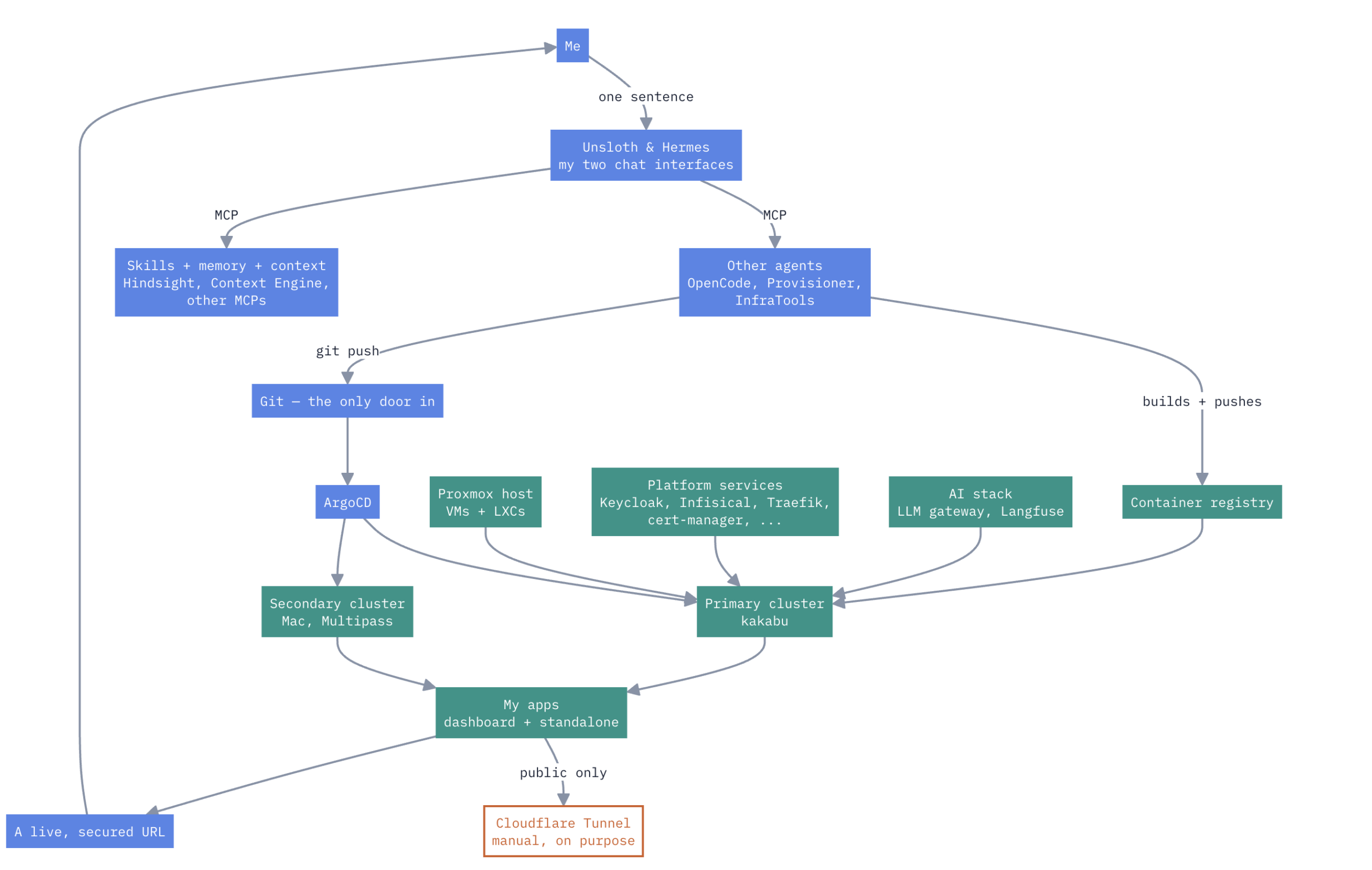
Here’s how it actually works.
Not a diagram I drew for a pitch deck — the real thing, warts and all. A couple of Kubernetes clusters, a pile of other services, and an AI agent I trust to operate real infrastructure inside guardrails it can’t talk its way out of. Below: how it’s wired, why it’s split the way it is, and what actually happens when I just ask for something and it shows up.
flowchart TD
    ME["Me"] -->|"one sentence"| FRONT["Unsloth & Hermes\nmy two chat interfaces"]
    FRONT -->|"MCP"| AGENTS["Other agents\nOpenCode, Provisioner,\nInfraTools"]
    FRONT -->|"MCP"| BRAIN["Skills + memory + context\nHindsight, Context Engine,\nother MCPs"]
    AGENTS -->|"builds + pushes"| REG["Container registry"]
    AGENTS -->|"git push"| GIT["Git — the only door in"]
    GIT --> ARGO["ArgoCD"]
    REG --> PRIMARY["Primary cluster\nkakabu"]
    HOST["Proxmox host\nVMs + LXCs"] --> PRIMARY
    ARGO --> PRIMARY
    ARGO --> SECOND["Secondary cluster\nMac, Multipass"]
    PLATFORM["Platform services\nKeycloak, Infisical, Traefik,\ncert-manager, ..."] --> PRIMARY
    AISTACK["AI stack\nLLM gateway, Langfuse"] --> PRIMARY
    PRIMARY --> APPS["My apps\ndashboard + standalone"]
    SECOND --> APPS
    APPS -->|"public only"| CF["Cloudflare Tunnel\nmanual, on purpose"]
    APPS --> LIVE["A live, secured URL"]
    LIVE --> ME

    classDef self fill:#0d9488,stroke:#0d9488,color:#fff
    classDef flow fill:#4986e8,stroke:#4986e8,color:#fff
    classDef manual fill:transparent,stroke:#d45b28,color:#d45b28,stroke-width:2px
    class HOST,PLATFORM,AISTACK,PRIMARY,SECOND,APPS,REG self
    class ME,FRONT,AGENTS,BRAIN,GIT,ARGO,LIVE flow
    class CF manual
The physical layout
Everything lives on one Proxmox host, split by weight. Anything that needs real isolation or heavy resource limits gets a full VM; anything single-purpose gets a lightweight LXC container instead — cheaper to run, faster to spin up, easy to snapshot.
VMs — heavy / isolated
LXCs — light / single-purpose
Two Kubernetes clusters, on purpose
Not redundancy — a trial system. One cluster is for apps that already proved they’re worth having; the other is where a new one has to earn that first.
Proven, and staying
A single k3s node running only what’s already earned its place: Keycloak (identity), LiteLLM (the LLM gateway), Langfuse (traces and evals every model call), my products, the dashboard. Nothing lands here without proving itself somewhere else first. GitOps-managed by ArgoCD — nothing here changes except through a git commit.
On trial
Everything new starts here, not on the primary cluster. I run it for a while and actually watch whether it helps — if it does, it gets promoted to the primary cluster; if it doesn’t, it just gets removed, no migration ceremony required. A fully independent k3s cluster, not even on the Proxmox box — the primary cluster’s ArgoCD reaches over and manages it remotely, as an extra deployment target.
flowchart LR
    IDEA["An app I want to try"] --> TRIAL["Runs on the\nsecondary cluster"]
    TRIAL --> DECIDE{"Actually\nuseful?"}
    DECIDE -->|"yes"| PROMOTE["Promoted to\nprimary — kakabu"]
    DECIDE -->|"no"| REMOVE["Removed —\nno ceremony"]

    classDef gate fill:#4986e8,stroke:#4986e8,color:#fff
    class DECIDE gate
How things actually talk to each other
Real names this time. A request into any app crosses five hand-offs before it reaches a pod — each one a separate self-hosted piece.
flowchart LR
    B["Browser"] --> DNS["Pi-hole\nresolve"]
    DNS --> TR["Traefik\nroute"]
    TR --> CM["cert-manager\nencrypt (local CA)"]
    CM --> AUTH{"Keycloak /\noauth2-proxy\nauthenticate"}
    AUTH --> POD["The app\nsecrets already synced\nfrom Infisical"]

    classDef self fill:#0d9488,stroke:#0d9488,color:#fff
    class DNS,TR,CM,AUTH,POD self
Getting to the outside world
There’s no public IP at home — everything above is LAN-only by default.
external Cloudflare Tunnel
For the handful of things that do need to be public — my education app, for instance — a Cloudflare Tunnel running on the Docker/Portainer VM punches an outbound-only connection to Cloudflare’s edge. No port forwarding, no router config, no public IP required at all.
self-hosted Everything else
Every other app, every login, every internal tool — reachable only from inside the LAN, resolved by Pi-hole, encrypted by my own CA. Nothing about the day-to-day setup depends on being reachable from the internet at all.
Storage & backups
Two tiers, not one. Fast NVMe for anything that actually runs, a big mirrored “tank” for everything else, and a separate backup habit on top of both.
flowchart LR
    M2["Fast tier\n2x 2TB M.2 NVMe"] --> WORK["Proxmox itself, every VM/LXC,\nall running workloads"]
    TANK["Bulk tier — 'the tank'\n~20TB, mirrored across 2 drives"] --> INT["Internal backup\non-site copy"]
    TANK --> EXT["External HDD\nrotated, kept off the box"]

    classDef self fill:#0d9488,stroke:#0d9488,color:#fff
    class M2,WORK,TANK,INT,EXT self
self-hosted Two tiers
Fast: 2x 2TB M.2 NVMe — where Proxmox itself, every VM and LXC, and all the actual workload lives. Speed matters here, capacity doesn’t.
Bulk: the ~20TB “tank,” mirrored across two physical drives — the actual data store: media, files, archives. Capacity and redundancy matter here, raw speed doesn’t.
self-hosted Backups
A separate internal backup on top of the tank’s mirror, plus a periodic copy to an external HDD that isn’t attached to the box day-to-day — so a backup actually survives something worse than a dead drive.
Security & disaster recovery
Not losing data isn’t a footnote here — it’s why the storage layer looks the way it does at all. Four independent layers, each one built to catch a different way things go wrong.
flowchart TD
    RISK1["A drive dies"] --> L1["ZFS mirror\n2x every drive"]
    RISK2["I break a VM,\ncontainer, or pod"] --> L2["Proxmox Backup Server\ndaily, several restore points"]
    RISK3["A file gets lost\nor corrupted"] --> L3["Separate file-level backup"]
    RISK4["The whole box\nis gone"] --> L4["External drive backups\noff the box entirely"]
    L1 --> OK["Data survives"]
    L2 --> OK
    L3 --> OK
    L4 --> OK

    classDef self fill:#0d9488,stroke:#0d9488,color:#fff
    classDef good fill:#4986e8,stroke:#4986e8,color:#fff
    class L1,L2,L3,L4 self
    class OK good
Everything else running here
Not every app needs to be a Kubernetes problem. These run as their own VM or LXC, entirely outside the GitOps repo — updated and managed on their own terms.
Where compute actually happens
Inference isn’t just “no GPU, so it’s all cloud.” It’s tiered: a fast, prod-grade GPU for anything latency-sensitive, a slower local box for research, and cloud only when both of those aren’t enough.
flowchart LR
    APP["An app / agent\nneeds a model"] --> GW["LLM gateway\n(in the primary cluster)"]
    GW --> T1["Tier 1 — GPU VM\nfast Nvidia GPU, always-on\nprod-level speed & reliability"]
    GW --> T2["Tier 2 — laptop (M5)\nslower, on-demand\nup to ~50B models\nresearch & testing"]
    GW --> T3["Tier 3 — cloud\nGemini / DeepSeek / OpenRouter\ngood, genuine overflow"]

    classDef local fill:#0d9488,stroke:#0d9488,color:#fff
    classDef cloud fill:transparent,stroke:#d45b28,color:#d45b28,stroke-width:2px
    class T1,T2 local
    class T3 cloud
flowchart TD
    NC["Nextcloud\nmy own file system"] -->|"WebDAV scan"| SCAN["Reads every file"]
    MAIL["Email\nread daily by an agent"] --> SCAN2["Reads every message"]
    SCAN --> SUM["Summarizes it"]
    SCAN2 --> SUM
    SUM --> FACTS["Extracts facts"]
    FACTS --> REL["Builds relations\nbetween files & messages"]
    REL --> ENT["Creates entities,\nbuilds profiles"]
    ENT --> CHUNK["Chunks it —\nsemantic, LLM-powered"]
    CHUNK --> STORE["Context Engine store"]
    STORE -.-> INJECT["Injected into a model call,\nonly when it's actually needed"]

    classDef self fill:#0d9488,stroke:#0d9488,color:#fff
    class NC,MAIL,SCAN,SCAN2,SUM,FACTS,REL,ENT,CHUNK,STORE,INJECT self
ArgoCD — the engine underneath all of this
Everything so far has been “git is the only door in.” This is the thing that actually enforces that sentence.
flowchart TD
    ROOT["Root Application\nwatches the control-plane branch"] --> SPAWN["One Application per file\nin the bootstrap folder"]
    SPAWN --> A1["prod apps\ntargetRevision: prod branch"]
    SPAWN --> A2["dev apps\ntargetRevision: dev branch"]
    SPAWN --> A3["system components\ntargetRevision: control-plane branch"]
    A1 --> DIFF["Continuously diffs\nlive cluster vs git"]
    A2 --> DIFF
    A3 --> DIFF
    DIFF -->|"match"| OK["Synced / Healthy"]
    DIFF -->|"drift — a manual kubectl edit?"| REVERT["Reverted automatically"]

    classDef good fill:#0d9488,stroke:#0d9488,color:#fff
    classDef fix fill:#d45b28,stroke:#d45b28,color:#fff
    class OK good
    class REVERT fix
The toolbox — what’s actually installed
The plumbing every app on the primary cluster shares. Every one of these showed up somewhere earlier in this doc — this is just the roster, in one place.
Apps I’ve actually built
Most of what I build for myself feeds into one dashboard, on purpose — I didn’t want a different login and a different tab for every little thing I make. Nothing forces that, though; a few apps deliberately stand on their own.
flowchart TD
    GARDEN["Garden Tracker\n+ its own MCP wrapper"] --> DASH["Dashboard\none UI, on purpose"]
    TASKS["Task Manager\n+ its own MCP wrapper"] --> DASH
    CAL["Calendar / Contacts / Checkups\n+ its own MCP wrapper"] --> DASH
    DASH --> ME["Me"]
    EDU["Education app\nits own accounts, its own UI"] --> ME
    SITE["Personal website\nits own thing entirely"] --> ME

    classDef dash fill:#4986e8,stroke:#4986e8,color:#fff
    classDef standalone fill:transparent,stroke:#8592a6,color:#8592a6,stroke-width:2px
    class DASH dash
    class EDU,SITE standalone
Education app
Built for my kids, and open to anyone else’s. Dari, math, and more — taught more like games than lessons. Every learner gets their own account; signup is open, not just for my family.
My website
nasersobhan.com — the consulting site, its own thing entirely. No reason it would ever belong inside the dashboard, so it doesn’t.
A few more are still cooking, running on the second cluster until they’re ready to be trusted with real use.
AIOps — where AI actually fits in
Not just a chat window pointed at git. This is the actual claim behind “AIOps”: give an agent the same context, tools, and memory a human operator would insist on, and it can be trusted to run real infrastructure — not just talk about it. A skills library, two kinds of MCP tools, a shared memory layer, and two information sources for when the usual ones aren’t enough — everything from here to the end of this doc is what those add up to.
The agents — five surfaces, each scoped on purpose
No single agent has the keys to everything. Assistants get broad access to information; the two that touch real infrastructure get exactly the access their one job needs — and neither of those two is actually one agent.
flowchart TD
    H["Hermes\nassistant agent"] --> BROAD["Every MCP + memory —\nContext Engine, Hindsight,\nSearXNG, Kiwix, all of it"]
    U["Unsloth\nmy chat UI"] --> BROAD
    OC["OpenCode\nisolated sandbox —\ncodes apps, ships features"] --> CODESCOPE["Personal Skills +\ncoding-only MCPs —\nno Context Engine, no infra access"]
    PROV["Provisioner\na small team of agents"] --> PROVSCOPE["Provisions what an app needs:\nDB, Redis, auth, and a client\nin Keycloak, Langfuse, Infisical"]
    INFRA["InfraTools\na small team of agents"] --> INFRASCOPE["k3s only: check pods,\ncreate apps, bump tags,\ncluster operations"]

    classDef broad fill:#4986e8,stroke:#4986e8,color:#fff
    classDef scoped fill:#0d9488,stroke:#0d9488,color:#fff
    class H,U,BROAD broad
    class OC,CODESCOPE,PROV,PROVSCOPE,INFRA,INFRASCOPE scoped
“Provisioner” and “InfraTools” are names for a job, not a single agent — each is a small coordinator handing off to smaller, single-purpose workers, and each has its own UI for watching what actually happened.
flowchart TD
    PROVJOB["Provisioner\ncoordinator"] --> INF["Infisical worker"]
    PROVJOB --> GITW["git worker"]
    PROVJOB --> KCW["Keycloak worker"]
    PROVJOB --> DBW["database + client workers\nLangfuse, others"]
    INF --> UI1["Provisioner UI —\nlogs, status, full history"]
    GITW --> UI1
    KCW --> UI1
    DBW --> UI1

    INFRAJOB["InfraTools\ncoordinator"] --> LOGSW["get logs"]
    INFRAJOB --> STATUSW["check pod status"]
    INFRAJOB --> TAGSW["bump image tags"]
    INFRAJOB --> REPLW["add replicas"]
    LOGSW --> UI2["InfraTools UI —\nlogs, status, full history"]
    STATUSW --> UI2
    TAGSW --> UI2
    REPLW --> UI2

    classDef self fill:#0d9488,stroke:#0d9488,color:#fff
    class PROVJOB,INF,GITW,KCW,DBW,UI1,INFRAJOB,LOGSW,STATUSW,TAGSW,REPLW,UI2 self
The hardware stays boring on purpose — one box, clearly split by weight, mostly outside Kubernetes. What’s actually interesting is what one sentence to an agent can trigger now: an audited existing app, or a freshly built one, both landing through the same guarded pipeline, executed by teams of agents that only ever have exactly the access their one job needs. Right up until the one door I still open by hand.
Two ways an app gets here
Every app on this cluster arrived one of two ways — I asked for something that already exists, or I asked for something new. Both start with one sentence to an agent, and both end up at the same deploy pipeline.
flowchart TD
    ASK["I ask:\n'deploy langfuse'"] --> PULL["Agent pulls the repo\n(or image)"]
    PULL --> READ["Reads it —\nwhat does this actually do?"]
    READ --> LOCAL["Runs it locally,\nsandboxed, exercises it"]
    LOCAL --> SCAN["Scans it —\ndependencies, known CVEs"]
    SCAN --> VERIFY["Checks docs against code —\nnot secretly doing something else"]
    VERIFY --> GATE{"All clean?"}
    GATE -->|"no"| STOP["Stops.\nReports what's wrong"]
    GATE -->|"yes"| ASKME["Shows me the findings,\nasks me to approve"]
    ASKME -->|"approved"| DEPLOY["-> the deploy pipeline\n(Fig I)"]

    classDef gate fill:#d45b28,stroke:#d45b28,color:#fff
    class GATE,ASKME gate
flowchart TD
    START["Idea / request"] --> GRILL["Grill + intake\nwhat, why, who, scope"]
    GRILL --> RESEARCH["Research\nskills + MCP context tools,\nuntil no unknowns remain"]
    RESEARCH --> ARCH["Architect\ndesigns it: components,\ndata, integrations"]
    ARCH --> VALIDATE["Validate\nagainst what was actually asked"]
    VALIDATE --> PROVISION["Provision\nvia MCP action tools,\nwith my sign-off"]
    PROVISION --> SCAFFOLD["Scaffold\nAGENTS.md + README\nas the project's own doc"]
    SCAFFOLD --> LOOP{"One feature\nat a time"}
    LOOP --> BRANCH["New git branch\nfor this feature"]
    BRANCH --> ENG["Engineer\ncodes it, commits\nafter every change"]
    ENG --> RISK{"Looks risky\nor critical?"}
    RISK -->|"no — keeps going"| TESTER["Tester\nverifies it, alone"]
    RISK -->|"yes"| ASK["Stops.\nAsks me."]
    ASK --> TESTER
    TESTER -->|"bug found"| FIX["Engineer\nfixes the bug"]
    FIX --> TESTER
    TESTER -->|"passes"| REVIEW["Reviewer\nchecks the diff"]
    REVIEW --> MERGE["Commit + merge\nthe feature branch"]
    MERGE -->|"more features"| LOOP
    MERGE -->|"all done"| E2E["Tester\nend to end, all green"]
    E2E --> SHIP["Ready to ship"]

    classDef loop fill:#d45b28,stroke:#d45b28,color:#fff
    classDef role fill:#0d9488,stroke:#0d9488,color:#fff
    class LOOP,RISK,ASK loop
    class ARCH,ENG,TESTER,FIX,REVIEW,E2E role
The deploy pipeline — where both paths end up
Whether it came from Fig. H or Fig. F, it lands here — the same guarded path every time, no exceptions per app.
flowchart TD
    READY["Ready to deploy\n(from Fig. H or Fig. F)"] --> PKG{"Already\npackaged?"}
    PKG -->|"no"| BUILD["Builds + pushes\na container image"]
    PKG -->|"yes"| SECRETS["Pushes secrets\nto Infisical"]
    BUILD --> SECRETS
    SECRETS --> DNS["Creates the internal\nDNS record"]
    DNS --> CERT["Requests a TLS cert\ncert-manager, local CA"]
    CERT --> TRAEFIK["Wires the ingress\nTraefik"]
    TRAEFIK --> SSO["Hooks up Keycloak SSO\ncreates a group if needed"]
    SSO --> PUSH["git push\nthe only door in"]
    PUSH --> GATE{"My\nsign-off"}
    GATE -->|"approved"| SYNC["ArgoCD syncs\n~3 min"]
    SYNC --> LIVE["Live.\nHands me the URL."]
    LIVE -.-> PUBLIC["Want it public too?\nThat's manual, on purpose\nCloudflare + my proxy, by hand"]

    classDef gate fill:#d45b28,stroke:#d45b28,color:#fff
    classDef manual fill:transparent,stroke:#d45b28,color:#d45b28,stroke-width:2px
    class GATE gate
    class PUBLIC manual
Written by
Naser Sobhan
A technology veteran with 18+ years building scalable systems for global enterprises. Now based in Rochester, MN, helping local businesses adopt AI safely and profitably.
How this is written: I'm a builder first, not a professional writer — my strength is the technical work, not turning it into prose. The ideas, opinions, and experience here are entirely mine, shaped by years actually doing this. I use AI to help organize my notes, tighten the language, and turn what's in my head into something worth reading.
Keep reading
All insights →
How to Design and Implement Software Architecture Patterns: 5 Best Practices
Designing and implementing software architecture patterns is a crucial aspect of software development. It is the foundation upon which the software is built,...

Unveiling the Top Traits of a Successful Software Engineer – What it takes to Excel in the Competitive World of Tech
In summary, a skilled software engineer should possess various technical abilities, a solid problem-solving aptitude, the ability to communicate effectively,...